Limits
The "Limits" configuration menu contains the following setting options. Depending on the axis type (MOVI-C, CiA402, etc.) these settings are partly transferred to the inverter.
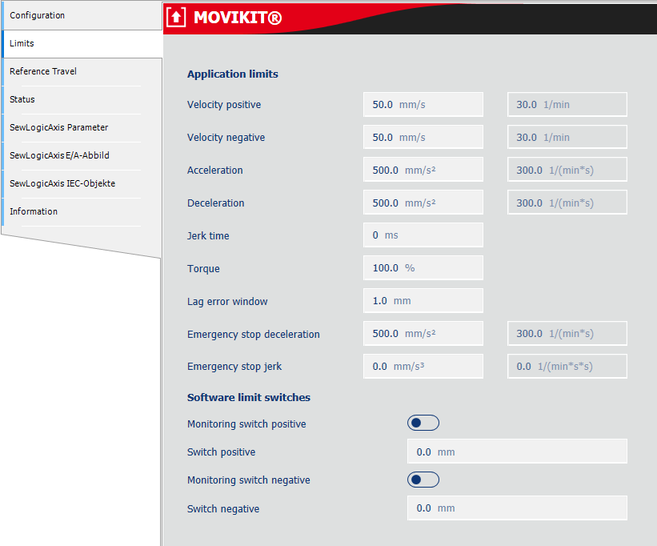

Parameter name | Description |
|---|---|
Application limits | |
Velocity positive | Maximum positive speed Written in parameter 8357.10 with MOVI-C® axes. INFORMATION: If the drive continuously runs at this limit, a lag error builds up that leads to an error if the lag error window is exceeded. It is recommended to set this value approx. 10% higher than the desired maximum speed. |
Velocity negative | Maximum negative speed Written in parameter 8357.11 with MOVI-C® axes. INFORMATION: If the drive continuously runs at this limit, a lag error builds up that leads to an error if the lag error window is exceeded. It is recommended to set this value approx. 10% lower than the desired maximum speed. |
Acceleration | Maximum acceleration Written in parameter 8357.12 with MOVI-C® axes. |
Deceleration | Maximum deceleration Written in parameter 8357.13 with MOVI-C® axes. |
Jerk time | Jerk time in [ms] of the MOVI-C® inverter Used for Stop FCBs 13/14/15 and inverter fault. Written in parameter 8357.14 with MOVI-C® axes. |
Torque | Maximum torque in % motor torque Written in parameter 8357.15 with MOVI-C® axes. |
Lag error window | Lag error window in user units Written in parameter 8510.4 with MOVI-C® axes. |
Emergency stop deceleration | Emergency stop deceleration in user units Written in parameter 8357.20 with MOVI-C® axes. |
Emergency stop jerk | Emergency stop jerk in user units |
Software limit switches | |
Monitoring switch positive | Activation of the positive software limit switch. The monitoring of the software limit switch is carried out in the controller. |
Switch positive | Positive software limit switch |
Monitoring switch negative | Activation of the negative software limit switch. The monitoring of the software limit switch is carried out in the controller. |
Switch negative | Negative software limit switch |
